
CCIP Intents
An intent is basically a request for a cross-chain outcome.
- You specify what outcomes you want (desired token, destination chain, recipient on destination), and,
- You specify what inputs you are providing for the transfer (e.g., source token and amount), and the protocol arranges fulfillment instead of you sending the message through the standard CCIP Router path yourself.
This page will show you how to use the Chainlink's Intents API to move USDC from Base to Ronin on mainnet.
Intents vs standard CCIP transfers
The same CCIP API serves both surfaces, but they model different things:
| Standard CCIP transfers | Intent-based transfers | |
|---|---|---|
| Execution model | Lock-and-mint / burn-and-mint message passing through the canonical CCIP router | Fulfillment-based: a provider fills your requested outcome |
| Identifier | CCIP messageId | Source transaction hash, then provider-prefixed intentId |
| Fees | Explicit fee token selection at send time | Implicit in the quote (inputAmount − expected output) |
| Status tracking | Onchain message state, or GET /messages/{messageId} | Intents API: GET /intents/tx/{txHash}, GET /intents/id/{intentId} |
| Arbitrary data | Fully programmable messaging | Limited customization options |
When to use intents
Common use cases for intents instead of standard CCIP transfers:
- Fast transfers: standard CCIP waits for full source-chain finality before executing on the destination chain, which takes roughly 18 minutes from Base and 12.8 from Ethereum (finality times by chain). With intents, a provider fills your requested outcome instead, so you get the speed without opting into Faster-Than-Finality at every layer of the message path or taking on its reorg risk.
- Cross-chain swaps: receive a different token on the destination chain than the one you sent, in a single transaction. Standard CCIP transfers deliver the same token you sent.
- Routes and assets standard CCIP does not serve: token support on standard CCIP requires the token issuer to deploy and register pools on each chain (CCT overview), so coverage grows one token at a time.
- Simpler fees and operations: the fee is implicit in the quote, so you never select, hold, or approve a fee token. You also skip destination gas estimation and manual execution handling.
If you need arbitrary messaging or programmable token transfers, use the standard CCIP transfer flow instead. Intents also serve mainnet routes only and require an API key; for anything outside the supported routes, use standard CCIP.
Access and prerequisites
Before you begin:
- Obtain an Intents API key (see above). This tutorial refers to it as the
INTENTS_API_KEYenvironment variable. - Hold ETH on Base for gas and USDC on Base to transfer. Both are real mainnet funds.
- Install
castfrom Foundry to send the onchain transactions.
How it works
An intent moves through five steps:
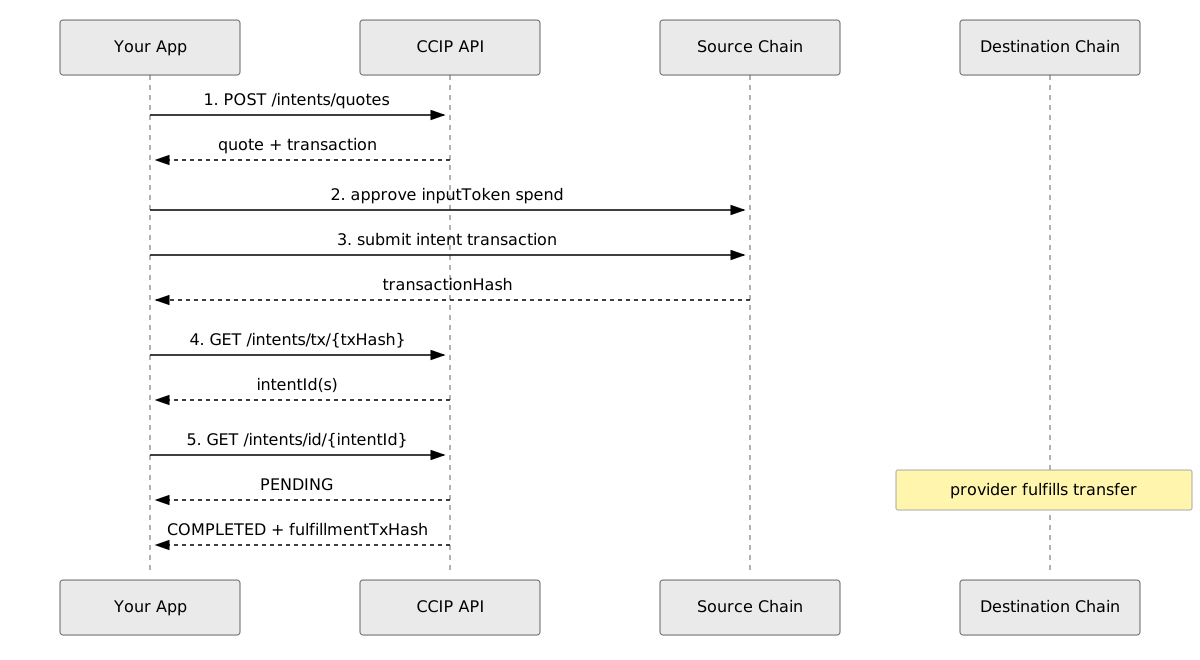
The CCIP intents flow: quote, approve, submit, discover the intent ID, then poll status.
- Quote:
POST /intents/quotesreturns the expected output amount and an executable transaction. - Approve: you approve the token spend required by the quote.
- Submit: you submit the quote's transaction on the source chain.
- Discover:
GET /intents/tx/{txHash}returns the intent ID (or IDs, for batched intents) created by that transaction. - Track: you poll
GET /intents/id/{intentId}until the intent reaches a terminal status.
Step 1: Get a quote
POST /intents/quotes prices a cross-chain swap or bridge operation and returns executable transaction data. This request quotes a transfer of 1 USDC (USDC has 6 decimals, so 1000000 in smallest units) from Base to Ronin:

export INTENTS_API_KEY="<your-intents-api-key>"
export SENDER_ADDRESS="<your-base-address>"
export RECEIVER_ADDRESS="<recipient-on-ronin>"

curl -s -X POST "https://api.ccip.chain.link/v2/intents/quotes" \
  -H "accept: application/json" \
  -H "Content-Type: application/json" \
  -H "x-api-key: $INTENTS_API_KEY" \
  --data @- <<EOF
{
  "sourceChainSelector": "15971525489660198786",
  "destChainSelector": "6916147374840168594",
  "inputToken": "0x833589fCD6eDb6E08f4c7C32D4f71b54bdA02913",
  "outputToken": "0x0B7007c13325C48911F73A2daD5FA5dCBf808aDc",
  "inputAmount": "1000000",
  "sender": "$SENDER_ADDRESS",
  "receiver": "$RECEIVER_ADDRESS",
  "calldata": "0x"
}
EOF
The request body fields:
| Field | Description |
|---|---|
sourceChainSelector | CCIP chain selector of the source chain. 15971525489660198786 is Base. |
destChainSelector | CCIP chain selector of the destination chain. 6916147374840168594 is Ronin. |
inputToken | Token you send on the source chain. Shown: USDC on Base. |
outputToken | Token you want to receive on the destination chain. Shown: USDC on Ronin. |
inputAmount | Amount in the token's smallest unit, as a decimal string. 1000000 is 1 USDC. |
sender | Address that submits the intent transaction on the source chain. |
receiver | Address that receives tokens on the destination chain. |
calldata | Optional hex-encoded execution data for arbitrary contract calls. Supported on some routes only; use 0x. |
A successful response contains the quote and the transaction to submit. Example response (illustrative):

{
  "inputAmount": "1000000",
  "expectedOutputAmount": "998500",
  "estimatedExecutionTime": 180,
  "transaction": {
    "chainFamily": "EVM",
    "transactionPurpose": "INTENT",
    "to": "0x15a7cA97D1ed168fB34a4055CEFa2E2f9Bdb6C75",
    "data": "0xabcdef1234567890...",
    "value": "0",
    "chainId": "8453"
  },
  "deadline": 1734192060,
  "refundable": false
}
Three response fields drive the rest of the flow:
transaction: the exact transaction to submit on the source chain: targetto,data, andvalue. Do not modify these fields; the quote is only valid for the transaction as returned.deadline: Unix timestamp (seconds) for quote validity. Submit before this time or re-request the quote. Some routes encode a separate, longer onchain deadline insidetransaction.datafor fulfillment;deadlineis the shorter quote-validity window.expectedOutputAmount: the destination-chain amount after all fees, in the output token's smallest unit. May be omitted if the provider does not return an estimate.
If the API returns 404 with ROUTE_NOT_FOUND, no provider serves that chain/token pair. Confirm any route you intend to use with a successful quote call before building on it. This tutorial uses the Base → Ronin USDC route from Supported routes and tokens.
For the full schema and an interactive playground, see Create quote for intent in the CCIP Tools API reference.
Step 2: Approve and submit the intent transaction
The intent transaction transfers tokens from your sender address to the protocol contract, so you must first approve the spend. Approve inputToken to the quote's transaction.to address for at least inputAmount:
export INTENT_TO="<transaction.to from your quote>"
export BASE_RPC_URL="<your-base-rpc-url>"
export PRIVATE_KEY="<your-private-key>"

cast send "0x833589fCD6eDb6E08f4c7C32D4f71b54bdA02913" \
  "approve(address,uint256)" "$INTENT_TO" 1000000 \
  --rpc-url "$BASE_RPC_URL" \
  --private-key "$PRIVATE_KEY"
Then submit the quote's transaction as-is, passing transaction.data as raw calldata and transaction.value as the value (typically "0" for intents):
cast send "$INTENT_TO" \
  --data "<transaction.data from your quote>" \
  --value 0 \
  --rpc-url "$BASE_RPC_URL" \
  --private-key "$PRIVATE_KEY"
Save the transaction hash from this submission; the next step uses it. If the quote's deadline has passed by the time you submit, discard the transaction and request a fresh quote.
Step 3: Get the intent ID
GET /intents/tx/{txHash} returns the status of every intent created in a transaction, as an array. A single transaction can create multiple batched intents. Use it to obtain the intentId after your submission confirms:
export TX_HASH="<your-submission-transaction-hash>"

curl -s "https://api.ccip.chain.link/v2/intents/tx/$TX_HASH" \
  -H "accept: application/json" \
  -H "x-api-key: $INTENTS_API_KEY"
Example response (illustrative), a single-element array:
[
  {
    "intentId": "EC-e429343c7b4c75e8c14ae8810b1fc8df20de32f05fa907c4839aa80a2c2db13e",
    "transactionHash": "0xabc1234567890def1234567890abcdef1234567890abcdef1234567890abcdef",
    "status": "PENDING",
    "subStatus": "WaitingToFulfill",
    "sourceChainSelector": "15971525489660198786",
    "destChainSelector": "6916147374840168594",
    "sender": "0x742d35Cc6634C0532925a3b844Bc9e7595f0bEb7",
    "receiver": "0x742d35Cc6634C0532925a3b844Bc9e7595f0bEb7",
    "inputToken": "0x833589fCD6eDb6E08f4c7C32D4f71b54bdA02913",
    "outputToken": "0x0B7007c13325C48911F73A2daD5FA5dCBf808aDc",
    "inputAmount": "1000000",
    "createdAt": 1734192060
  }
]
Intent IDs are provider-prefixed (for example, EC-... or EO-...). Raw 0x transaction hashes are not valid intent IDs, which is why this lookup step exists. To extract the ID for the next step with jq:
export INTENT_ID=$(curl -s "https://api.ccip.chain.link/v2/intents/tx/$TX_HASH" \
  -H "accept: application/json" \
  -H "x-api-key: $INTENTS_API_KEY" | jq -r '.[0].intentId')
.[0] assumes the transaction created one intent; if you batch intents, select the right element instead. The lookup can also return 404 until the transaction is indexed, so retry after a few seconds if your submission just confirmed.
Once you have the intentId, prefer GET /intents/id/{intentId} for status queries. For the full schema, see Get all intent statuses for a transaction.
Step 4: Track the intent to completion
Prefer GET /intents/id/{intentId} to return the status of one intent:
curl -s "https://api.ccip.chain.link/v2/intents/id/$INTENT_ID" \
  -H "accept: application/json" \
  -H "x-api-key: $INTENTS_API_KEY"
Poll until status reaches a terminal value: COMPLETED or FAILED. A 10-second interval is a reasonable default:
while true; do
  STATUS=$(curl -s "https://api.ccip.chain.link/v2/intents/id/$INTENT_ID" \
    -H "accept: application/json" \
    -H "x-api-key: $INTENTS_API_KEY" | jq -r '.status')
  echo "$STATUS"
  [ "$STATUS" = "COMPLETED" ] || [ "$STATUS" = "FAILED" ] && break
  sleep 10
done
When the intent completes, the response includes outputAmount (the actual amount delivered) and fulfillmentTxHash (the fulfillment transaction on the destination chain). For refunded intents, fulfillmentTxHash is the refund transaction on the source chain and filledAt carries the refund timestamp:
{
  "intentId": "EC-e429343c7b4c75e8c14ae8810b1fc8df20de32f05fa907c4839aa80a2c2db13e",
  "transactionHash": "0xabc1234567890def1234567890abcdef1234567890abcdef1234567890abcdef",
  "status": "COMPLETED",
  "subStatus": null,
  "sourceChainSelector": "16015286601757825753",
  "destChainSelector": "3478487238524512106",
  "fulfillmentTxHash": "0xdef4567890abcdef1234567890abcdef1234567890abcdef1234567890abcdef12",
  "sender": "0x742d35Cc6634C0532925a3b844Bc9e7595f0bEb7",
  "receiver": "0x742d35Cc6634C0532925a3b844Bc9e7595f0bEb7",
  "inputToken": "0x1c7D4B196Cb0C7B01d743Fbc6116a902379C7238",
  "outputToken": "0x75faf114eafb1BDbe2F0316DF893fd58CE46AA4d",
  "inputAmount": "1000000",
  "outputAmount": "998500",
  "createdAt": 1734192060,
  "filledAt": 1734192240
}
For the full schema and playground, see Get intent status by ID.
Intent attribute reference
The values below cover what the tracking loop in this tutorial uses. For complete schemas, see the CCIP Tools API reference.
status: high-level intent state:
| Value | Meaning |
|---|---|
PENDING | The intent is processing. |
COMPLETED | The intent has been fulfilled. |
FAILED | The intent has failed and cannot be fulfilled. |
Other attributes:
| Attribute | Values / format |
|---|---|
subStatus | Route-specific detail, for display only. Example: WaitingToFulfill. |
intentId | Provider-prefixed string (EC-..., EO-...). Obtain it from GET /intents/tx/{txHash}. |
chainFamily | EVM for all served routes. |
transactionPurpose | INTENT: the transaction is ready to submit onchain. |
inputAmount, outputAmount | Decimal strings in the token's smallest unit. |
deadline, createdAt, filledAt | Unix timestamps in seconds. |
Supported routes and tokens
The Intents API serves mainnet routes only; no testnet routes are available. Route support is per chain/token pair and evolves as providers add support. The quote endpoint returns 404 ROUTE_NOT_FOUND when no provider serves a requested pair; confirm production availability with your Chainlink representative before integrating a specific pair.
Routes served at the time of writing (mainnet)
| Source chain | Destination chain | Tokens |
|---|---|---|
| Ethereum | Ronin | USDC, WETH |
| Ronin | Ethereum | USDC, WETH |
| Base | Ronin | USDC, WETH |
| Ronin | Base | USDC, WETH |
Token contract addresses:
| Token | Ethereum | Base | Ronin |
|---|---|---|---|
| USDC | 0xA0b86991c6218b36c1d19D4a2e9Eb0cE3606eB48 | 0x833589fCD6eDb6E08f4c7C32D4f71b54bdA02913 | 0x0B7007c13325C48911F73A2daD5FA5dCBf808aDc |
| WETH | 0xC02aaA39b223FE8D0A0e5C4F27eAD9083C756Cc2 | 0x4200000000000000000000000000000000000006 | 0xc99a6A985eD2Cac1ef41640596C5A5f9F4E19Ef5 |
Next steps
- API reference: Create quote for intent
- API reference: Get all intent statuses for a transaction
- API reference: Get intent status by ID
- CCIP Tools overview
- Transfer tokens with standard CCIP